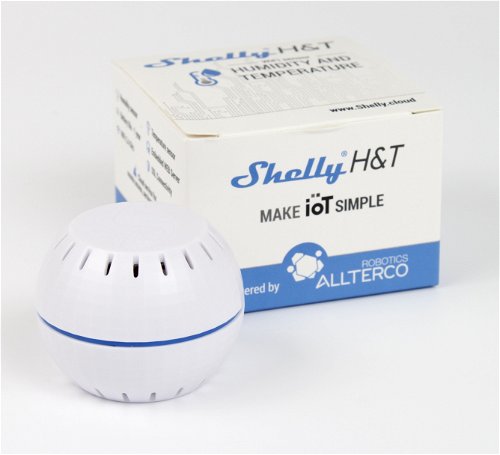
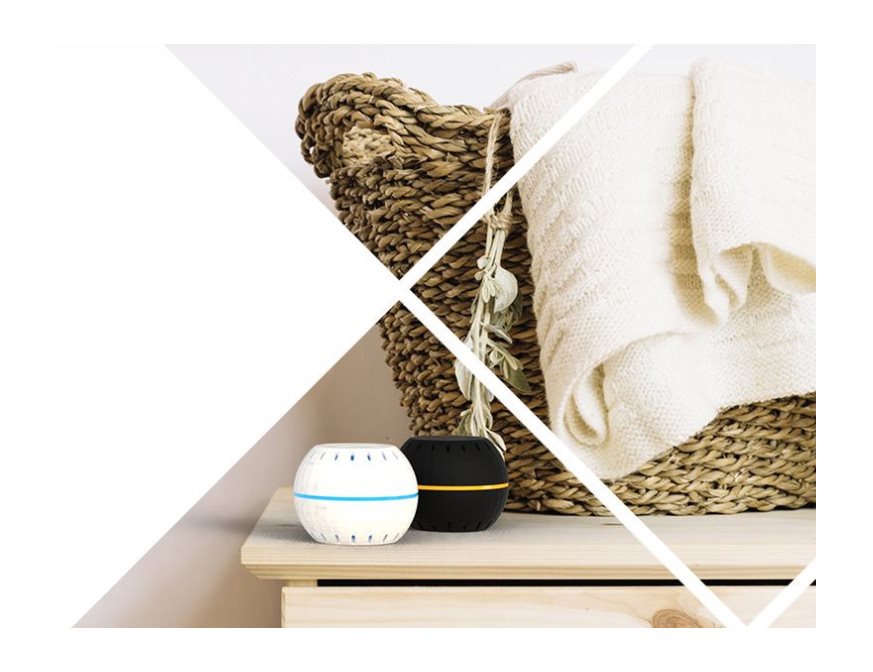
Shelly HT Battery Temperature and Humidity Sensor, White, WiFi
3.78 ratings
Detector - wireless, measures temperature and humidity, miniature dimensions, easy installation, LED, cloud service, battery 1x CR123A with up to 18 months, free cloud service for remote monitoring, regulation, automation and data recording (1 year) record), MQTT, API integration, WiFi
Shelly HT Battery Temperature and Humidity Sensor, White, WiFiDiscontinued
Shelly HT Battery Temperature and Humidity Sensor, White, WiFi
Shelly HT temperature and humidity sensor
For measuring temperature and humidity in your home, we can offer you a smart Shelly HT detector. Thanks to its small dimensions and easy installation, it fits into almost any room. The device is powered by a battery that is not included in the package. Used properly, it will last up to 18 months. The advantage is that the detector can be used with other equipment from Shelly.
WiFi
Shelly HT does not need any central element for communication and connects directly to WiFi.
Remote control
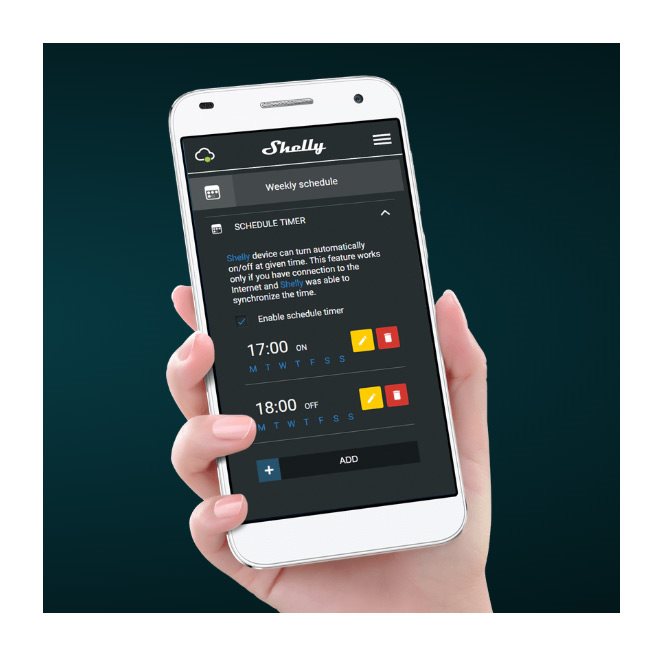
Using the mobile application, the Shelly HT sensor can be controlled remotely.
Stamina
CR123A battery life is 18 months.
Humidity
Proper humidity is especially important for the overall well-being of living. With the Shelly sensor, for example, you avoid conditions for the growth of dangerous fungi.
Temperature
Monitor the air temperature and, for example, regulate the heating or, in summer, the window shading according to the measured values.
Shelly Cloud
The Shelly cloud storage is used to store measured data. You can even view historical values up to 12 months old.
Clear mobile application
With the Shelly HT detector, you also get a clear mobile application with comprehensive supervision of functions.
Small version of the Shelly HT detector
The elegantly small design guarantees that you can place the Shelly HT temperature and humidity sensor virtually anywhere.
Specifications
Connection
WiFi 2.4 GHz
Supported OS
Android, iOS, Windows
Compatible voice assistants
Amazon Alexa, Google Assistant
Application language
Czech, English, German, Slovak
Expandability
Open system
Connection
Connection
WiFi 2.4 GHz
Connectivity
Supported OS
Android, iOS, Windows
Compatible voice assistants
Amazon Alexa, Google Assistant
Application language
Czech, English, German, Slovak
Use
Expandability
Open system
Area of use
Security
Battery
Battery type
CR123A
Functions and features
Range
50 m
Detection Type
Detection Type
Humidity, temperature
More Specifications
Shelly Group LLc., : 51 Cherni Vrah Blvd., building 3, floor 2 and 3, 1407 Sofia, Bulgaria, [email protected] , +359 2 957 1249
Note:
Specifications can be changed without notice. Images are for illustrative purposes only.
Dobrý deň,
mám otázku. Môže byť tento snímač trvale, celoročne umiestnení vo vonkajšom prostredí ?
Ďakujem za skorú odpoveď.
František Supek
Dobrý deň,
mám otázku. Môže byť tento snímač trvale, celoročne umiestnení vo vonkajšom prostredí ?
Ďakujem za skorú odpoveď.
František Supek
Nedaří se mi připojit senzory k aplikaci. Nepochopil jsem, jestli musím být při párování připojený na domácí wifi anebo na wifi ze senzoru? senzory se tváří že se spárují, když připojím mobil k wifi senzoru, naklikám i místnost, zdám senzoru jméno apod. ale když to skončí, senzor v místnosti není. podle návodu v letáku stačí vytvořit místnost a pak do něj přidat zařízení. To tlačítko ale nefunguje, nic se neděje. Když jdu přes menu a Add device, někdy to senzor vidí, jindy ne, někdy až na poněkolikáté a když ho přidávám, proces se zasekne po kliknutí na zaškrtávátko vedle vybíraného senzoru a pak připojit zařízení. Pak je celá obrazovka zakrytá hláškou a nic se neděje velmi dlouho, mezi tím přestane blikat dioda na senzoru. Celá aplikace se zasekne a nic se nedějě, tak ji musím vypnout. Dál jsem nepokročil. Potřeboval bych pomoct, aby mi asi někdo zavolal a provedl mě tím procesem... Mám Android.
Nedaří se mi připojit senzory k aplikaci. Nepochopil jsem, jestli musím být při párování připojený na domácí wifi anebo na wifi ze senzoru? senzory se tváří že se spárují, když připojím mobil k wifi senzoru, naklikám i místnost, zdám senzoru jméno apod. ale když to skončí, senzor v místnosti není. podle návodu v letáku stačí vytvořit místnost a pak do něj přidat zařízení. To tlačítko ale nefunguje, nic se neděje. Když jdu přes menu a Add device, někdy to senzor vidí, jindy ne, někdy až na poněkolikáté a když ho přidávám, proces se zasekne po kliknutí na zaškrtávátko vedle vybíraného senzoru a pak připojit zařízení. Pak je celá obrazovka zakrytá hláškou a nic se neděje velmi dlouho, mezi tím přestane blikat dioda na senzoru. Celá aplikace se zasekne a nic se nedějě, tak ji musím vypnout. Dál jsem nepokročil. Potřeboval bych pomoct, aby mi asi někdo zavolal a provedl mě tím procesem... Mám Android.
Dobrý den. Zakoupil jsem toto čidlo a zkoušel je sparovat přes WiFi hotspot. Bohužel se mi senzor v aplikaci nezobrazil. Je nějaké omezení, které číslo při wifi signálu má (vyjma 2,4 GHz pásma) ?
Dobrý den. Zakoupil jsem toto čidlo a zkoušel je sparovat přes WiFi hotspot. Bohužel se mi senzor v aplikaci nezobrazil. Je nějaké omezení, které číslo při wifi signálu má (vyjma 2,4 GHz pásma) ?
dobrý den, koupil jsem shelly teploměr a potřebuji nastavit scénu tak, aby při teplote pod 10 stupnů se seplo další shelly relé které mi pustí napětí do zásuvky v které bude topidlo.Až teplota vzroste na 18 stupnu tak aby vypla. Možná to nepujde tímto zpusobem pořádně vysvětlit ale nikde jsem nenašel přesný postup jak tohle nastavit. Myslím v českém jazyce. Děkuji Michal
dobrý den, koupil jsem shelly teploměr a potřebuji nastavit scénu tak, aby při teplote pod 10 stupnů se seplo další shelly relé které mi pustí napětí do zásuvky v které bude topidlo.Až teplota vzroste na 18 stupnu tak aby vypla. Možná to nepujde tímto zpusobem pořádně vysvětlit ale nikde jsem nenašel přesný postup jak tohle nastavit. Myslím v českém jazyce. Děkuji Michal
Dobrý den, zakoupil jsem teploměr od shelly a připojil na domácí síť. Teploměr nameril 1x hodnotu a tu mi do aplikace uložil a tato hodnota pořád zůstává stejná. V aplikaci to píše že zařízení se nastaví až se probere z nouzového režimu ale za 3 dny nic. Tato hláška stále zůstává. Co stim?
Dobrý den, zakoupil jsem teploměr od shelly a připojil na domácí síť. Teploměr nameril 1x hodnotu a tu mi do aplikace uložil a tato hodnota pořád zůstává stejná. V aplikaci to píše že zařízení se nastaví až se probere z nouzového režimu ale za 3 dny nic. Tato hláška stále zůstává. Co stim?
Try our cookiesAlza.cz a. s., Company identification number 27082440, use cookies and other data to ensure the proper functioning of the website and, with your consent, also, among other things, to personalize advertising and the content of our websites. By clicking on the “I understand“ button, you agree to the use of cookies and the transfer of data regarding the behavior on the website for displaying targeted advertising on social networks and advertising networks on other websites.
We use 8 categories of cookies on our website:
Technical cookies
These are strictly necessary for the functioning of the website and the features you choose to use. Without them, our website would not work; you wouldn't be able to log in to your user account, for example.
Functionality cookies
These cookies allow us to remember your basic choices and improve the user experience. These include remembering your preferred language or allowing you to stay logged in permanently.
Social media cookies
These cookies allow us to easily link you to your social media profile and, for example, allow you to share products and services with your friends and family.
Content personalisation
These cookies allow us to show you content and ads according to the information we have about you to best meet your needs. This includes what content you have viewed, or on what device you are accessing our website.
Non-personalised advertising
These cookies allow us to show you general ads for products and services.
Personalised advertising
Thanks to these cookies, we and our partners can offer you relevant products and services based on your purchases, your shopping behaviour and your preferences.
Audience metrics
These cookies allow us to optimise our site for your convenience based on how you use it. The aim is to remember or anticipate your choices. This includes, for example, the use of features, their location, or the behaviour on the page.
By giving your consent to the processing of cookies, functionality and analytical cookies will be installed on the device you use to browse the website (click on the "I understand" button for both categories, or you can select only one of the categories by clicking on the "Settings" button). We always install technical cookies on your device, even without your explicit consent, because without them our website would simply not work.
You can revoke your consent to the processing of cookies. In connection with our company's cookie processing, you also have the following rights: the right to access cookies, delete, modify, supplement and correct them, restrict processing and the right to lodge a complaint with the Office for Personal Data Protection. Read more about your rights.